How to File Insurance Complaint Through TIRAMIS in Tanzania?
When an insurance claim is delayed or rejected without a clear explanation, it can quickly become stressful. Many people in Tanzania don’t know where to turn when this happens or how to properly raise a complaint. That’s where the TIRA-MIS system comes in.
The Tanzania Insurance Regulatory Authority (TIRA) created this online platform so customers can report insurance problems directly without visiting an office or standing in long queues. Whether it’s a delayed claim, poor service, or unfair treatment, you can now submit your complaint online and track it step by step.
In this guide, you’ll learn exactly how to file an insurance complaint through TIRAMIS, what information you need, and what happens after you submit it.
How to Submit an Insurance Complaint Through TIRA-MIS
If you don’t know how to submit the complaint online using tiramis below is a step-by-step of the entire process.
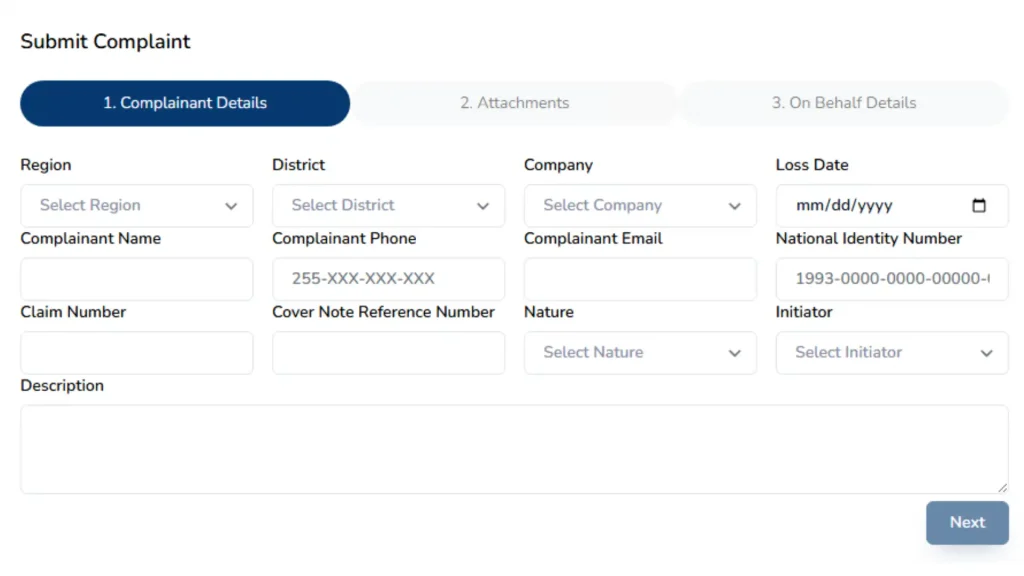
Step 1: Enter Your Personal and Claim Details
This is the first page you see when you begin the complaint process.
Before filling out the form, keep these things nearby:
Provide Your Contact Information
The form requires you to enter:
Make sure all information is correct. Mistakes, especially in your phone or NIDA number, can slow down the process.
Enter Your Insurance Details
You also need to fill in:
- Claim Number: Enter the claim number given by the insurance company.
- Cover Note Reference Number: It is given to you by your insurance company. ( You can only use cover note you can’t use sticker number or plate number).
- Nature of Complaint: choose from a list such as:
- delay of claim
- failure to pay
- rude communication
- unfair treatment
- poor service
- Policy Holder
- This means the person who owns the insurance policy.
- If the insurance is under your name, then you select this option.
- This means someone who is not the policy owner but is affected by the incident.
- This is the person who is submitting the complaint on behalf of someone else.
- It can be:
- A family member
- A representative
- An agent
- An employee helping the policy holder
- Policy Holder
- This means the person who owns the insurance policy.
- If the insurance is under your name, then you select this option.
- This means someone who is not the policy owner but is affected by the incident.
- This is the person who is submitting the complaint on behalf of someone else.
- It can be:
- A family member
- A representative
- An agent
- An employee helping the policy holder
- This means the person who owns the insurance policy.
- If the insurance is under your name, then you select this option.
- Third Party
- This means someone who is not the policy owner but is affected by the incident.
- This is the person who is submitting the complaint on behalf of someone else.
- It can be:
- A family member
- A representative
- An agent
- An employee helping the policy holder
- Third Party
- This means someone who is not the policy owner but is affected by the incident.
- Registrant
- This is the person who is submitting the complaint on behalf of someone else.
- It can be:
- A family member
- A representative
- An agent
- An employee helping the policy holder
- Registrant
- This is the person who is submitting the complaint on behalf of someone else.
- It can be:
- A family member
- A representative
- An agent
- An employee helping the policy holder
- A family member
- It can be:
- A family member
- A representative
- An agent
- An employee helping the policy holder
- An agent
- A representative
- An agent
- An employee helping the policy holder
Explain Your Complaint Clearly
“My vehicle was involved in an accident on 10/05/2025. The insurance company has delayed my claim for two months and has not given me any update despite several follow-ups.”
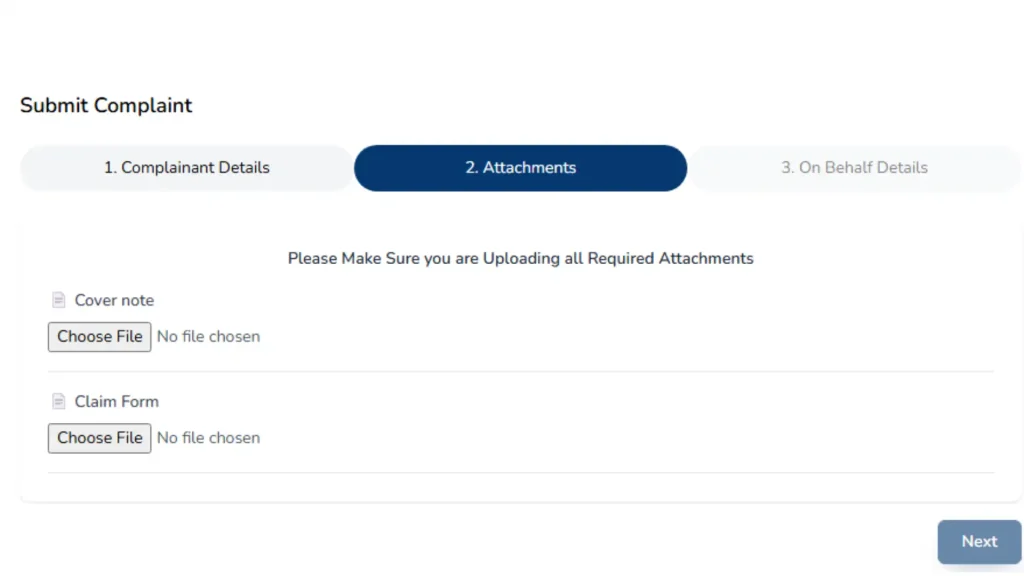
Step 2: Upload Your Supporting Documents
Once your personal details are submitted, the system moves to the Attachments section. This is where you upload the documents needed for TIRA to review your case.
Required Documents
You must upload:
Step 3: Fill in the “On Behalf” Details
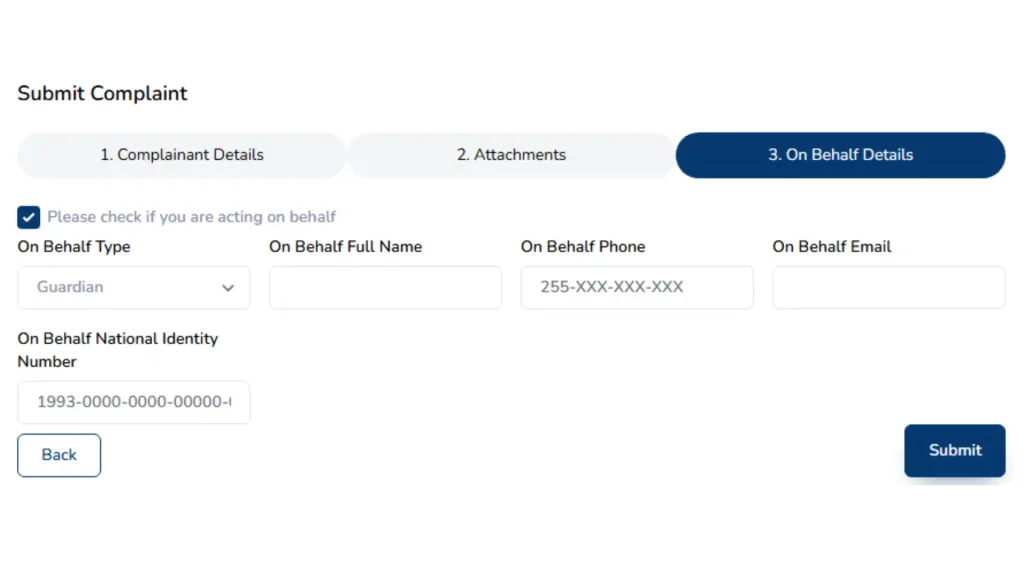
This step is only required if you are submitting a complaint for another person. For example:
If you are filing for yourself, you can skip this step.
Choose the Type of Representation
If your are applying on someone’s behalf then choose from the options given below with respect to the relation :
Enter Their Details
You’ll need to fill in:
Make sure the details match with the identification documents.
Step4: Submit Your Complaint
Click the submit button to complete the process. The system will generate a complaint reference number, which you will use for tracking.
Note: Keep the complaint reference number safe; you will need it later to track the complaint status.
How TIRA Takes Action Submitting the Complaint?
Once your complaint is submitted:
The review time varies depending on the complexity of the issue, but TIRA generally responds faster when all documents are correct.
Tips to Make Your Complaint Process Faster
Real Contact Details
Use real contact details because TIRA will call or email you. Wrong information leads to delays.
Upload clear documents
Blurred or unreadable documents slow down the investigation.
Describe Issue Properly
Try to explain your issue clearly as clear explanations help officers understand your case easily and the action will be taken soon.
Conclusion
Every insurance customer deserves fair treatment. Whether you’re driving a car, riding a boda boda, or insuring property when things go wrong, you should be able to get help easily. The TIRA-MIS e-complaint system is a powerful tool designed to protect you.
By following these steps, gathering proper documents, and submitting clear information, you give yourself the best chance to resolve your complaint quickly and fairly.